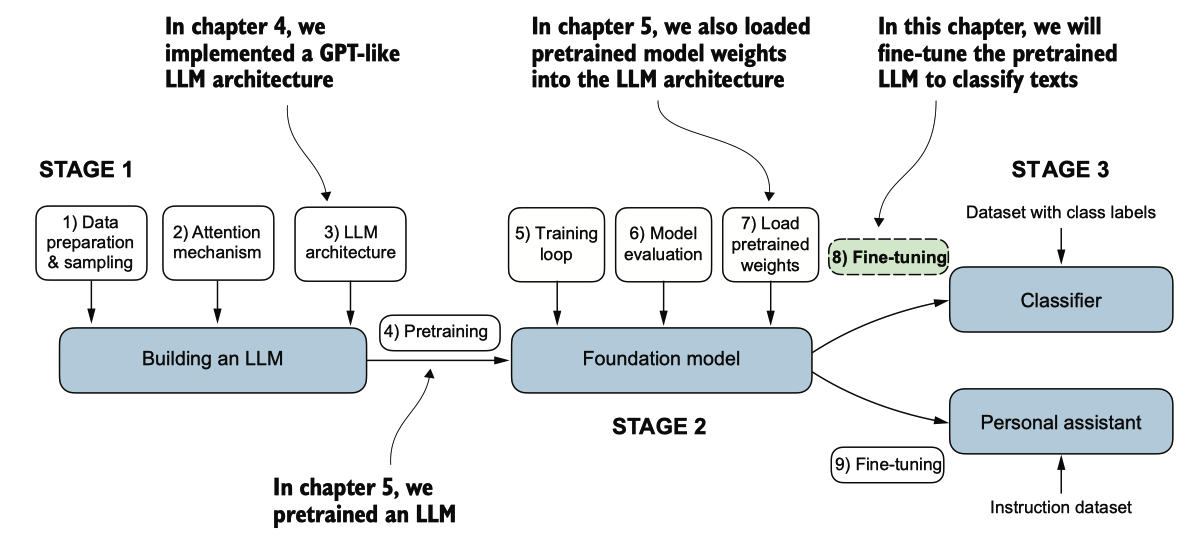
Figure 6.1 The three main stages of LLM development. This chapter focuses on stage 3 (step 8): fine-tuning a pretrained LLM as a classifier.
The most common approaches for fine-tuning language models are instruction fine-tuning and classification fine-tuning. Instruction fine-tuning involves training a language model on a set of tasks, using specific instructions to improve its ability to understand and carry out tasks described in natural-language prompts, as shown in Figure 6.2.
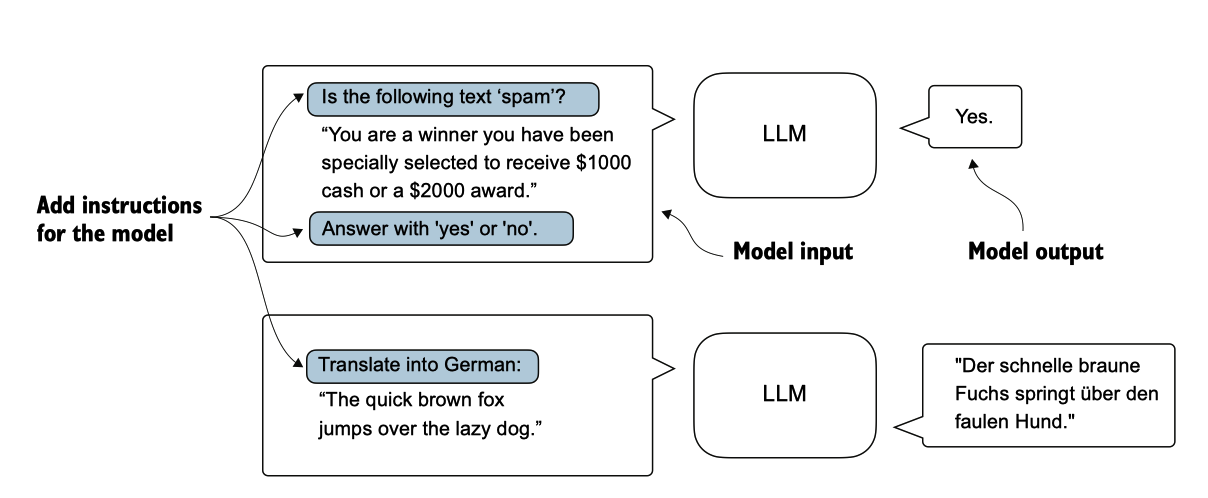
Figure 6.2 Two different instruction fine-tuning scenarios. At the top, the model's task is to determine whether a given text is spam. At the bottom, the model receives an instruction on how to translate an English sentence into German.
A fine-tuned classification model is limited to predicting the classes it encountered during training. For example, it can determine whether something is “spam” or “not spam,” as shown in Figure 6.3, but it cannot make any other judgment about the input text.
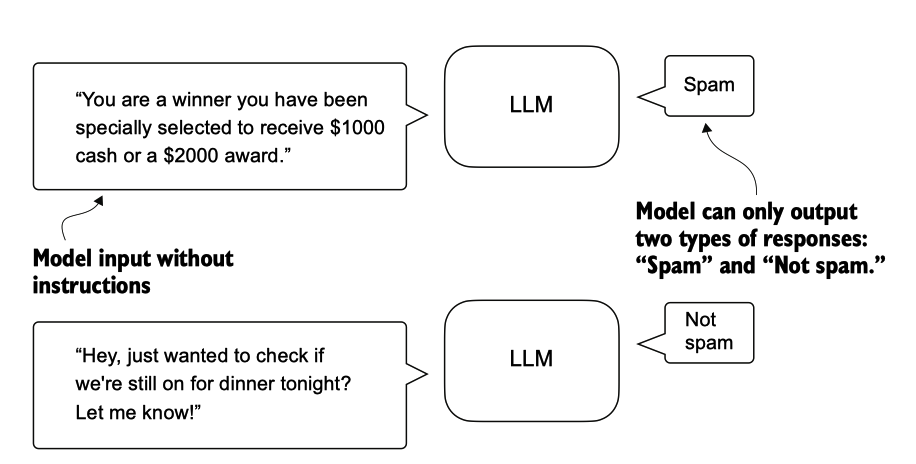
Figure 6.3 A text classification scenario using an LLM. A model fine-tuned for spam classification does not need further instructions alongside the input. Unlike an instruction-fine-tuned model, it can only respond with “spam” or “not spam.”
Compared with the classification-fine-tuned model shown in Figure 6.3, instruction-fine-tuned models can usually handle a broader range of tasks. We can think of a classification-fine-tuned model as highly specialized, and it is usually easier to develop a specialized model than a general-purpose model that performs well across many tasks.
[!NOTE] Choosing the Right Approach
Instruction fine-tuning improves a model's ability to understand and generate responses based on specific user instructions. It is best suited to models that need to handle multiple tasks according to complex user instructions, thereby increasing flexibility and interaction quality. Classification fine-tuning is well suited to projects that require accurately classifying data into predefined categories, such as sentiment analysis or spam detection.
Although instruction fine-tuning is more flexible, it requires larger datasets and more compute to develop a model that is proficient across a variety of tasks. By contrast, classification fine-tuning requires less data and compute, but its use is limited to the specific categories the model was trained on.
Preparing the Dataset
We will modify and classification-fine-tune the GPT model we previously implemented and pretrained. We'll start by downloading and preparing the dataset, as shown in Figure 6.4. To provide an intuitive and useful example of classification fine-tuning, we'll work with a dataset of text messages containing both spam and non-spam messages.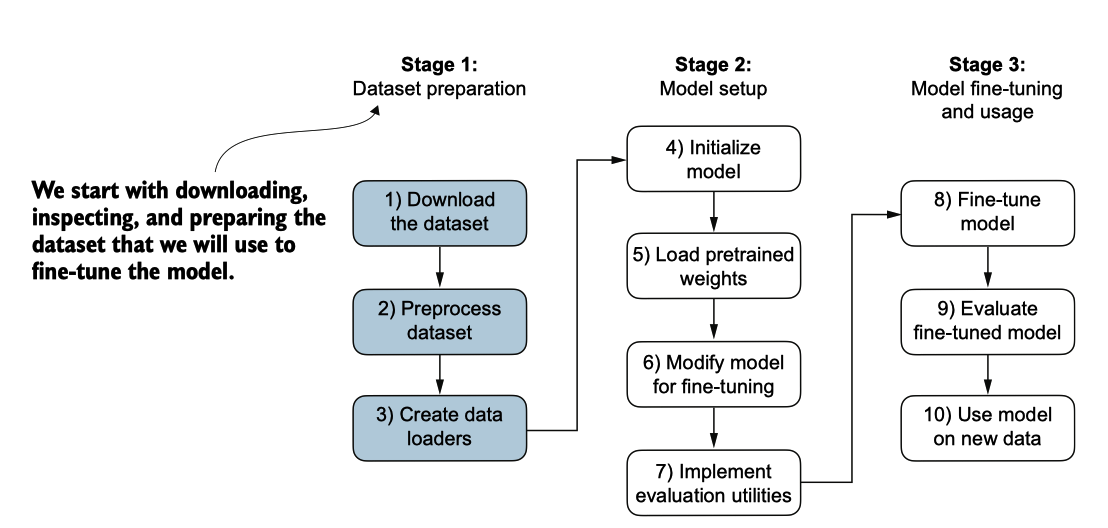
Figure 6.4 A three-stage process for classification fine-tuning an LLM. Stage 1 involves dataset preparation. Stage 2 focuses on model setup. Stage 3 covers fine-tuning and evaluating the model.
After running the preceding code, the dataset is saved as a tab-separated text file, SMSSpamCollection.tsv, in the smsspamcollection folder. We can load it into a pandas DataFrame as follows:
import pandas as pd

df = pd.read_csv(data_file_path, sep="\t", header=None, names=["Label", "Text"])
df

output
Let's look at the distribution of the class labels.
print(df["Label"].value_counts())

## output
Label
ham     4825
spam     747
Name: count, dtype: int64
For simplicity, and because we prefer a smaller dataset (which will help fine-tune the LLM faster), we'll undersample the dataset so that it contains 747 examples of each class.
Next, we'll convert the string class labels “ham” and “spam” into the integer class labels 0 and 1, respectively. This process is similar to converting text into token IDs. However, here we're dealing with just two token IDs, 0 and 1, instead of a GPT vocabulary containing more than 50,000 words.
Next, we'll create a random_split function that splits the dataset into three parts: 70% for training, 10% for validation, and 20% for testing. (These proportions are common in machine learning for training, tuning, and evaluating models.)
Creating Data Loaders
We'll build PyTorch data loaders that are conceptually similar to the ones we implemented when working with text data.
Previously, we used a sliding-window technique to generate uniformly sized text chunks and then grouped them into batches for more efficient model training. Each chunk served as an independent training example.
However, we're now working with a spam dataset containing text messages of different lengths. To batch these messages the way we did with text chunks, we have two main options:
- Truncate all messages to the length of the shortest message in the dataset or batch.
- Pad all messages to the length of the longest message in the dataset or batch. The first option is computationally cheaper, but if the shorter messages are much shorter than the average or longest message, it can lead to significant information loss and potentially degrade model performance. We therefore choose the second option, which preserves the full content of every message.
To batch all messages by padding them to the length of the longest message in the dataset, we add a padding token to every shorter message. For this, we use “<|endoftext|>” as the padding token.
However, instead of appending the string “<|endoftext|>” directly to each text message, we can add the token ID corresponding to “<|endoftext|>” to the encoded text message, as shown in Figure 6.6.
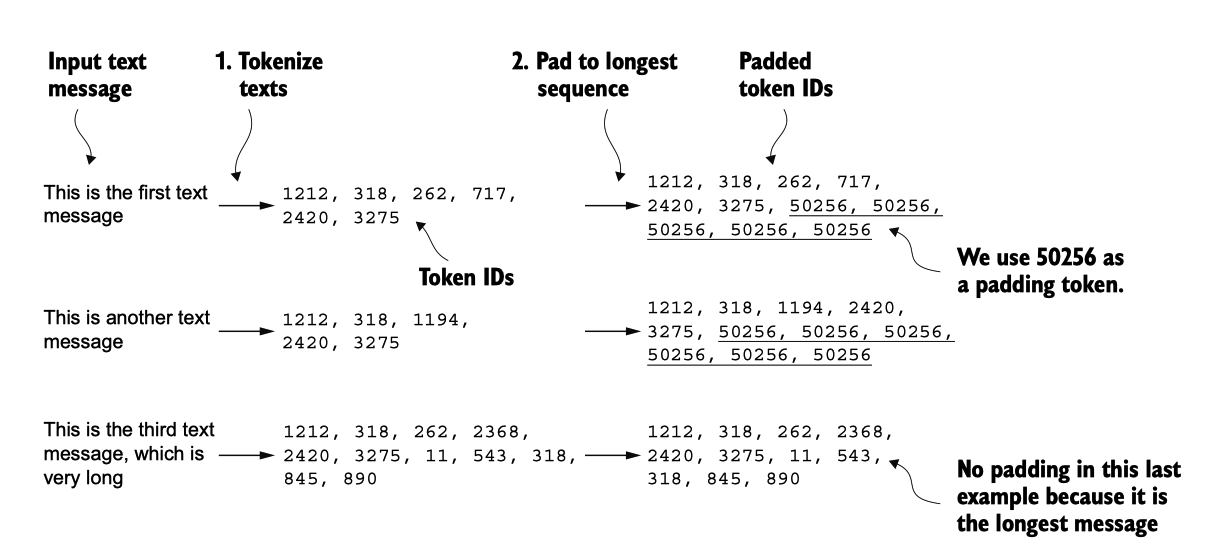
Figure 6.6 Input text preparation process. First, each input text message is converted into a sequence of token IDs. Then, to ensure uniform sequence length, shorter sequences are padded with a padding token (in this case, token ID 50256) to match the length of the longest sequence.
We first need to implement a PyTorch dataset that specifies how the data is loaded and processed before the data loader is instantiated.
To do this, we define the SpamDataset class, which implements the concepts in Figure 6.6. The SpamDataset class handles several key tasks: it identifies the longest sequence in the training dataset, encodes the text messages, and ensures that all other sequences are padded with a padding token to match the length of the longest sequence.
The SpamDataset class loads data from the CSV files we created earlier, tokenizes the text with tiktoken's GPT-2 tokenizer, and lets us pad or truncate sequences to a uniform length determined by the longest sequence or a predefined maximum length. This ensures that every input tensor has the same size, which is necessary for creating batches in the training data loader we'll implement next.
The longest sequence length is stored in the dataset's max_length attribute. If you want to see the number of tokens in the longest sequence, you can use the following code:
train_dataset = SpamDataset(
    csv_file="train.csv",
    max_length=None,
    tokenizer=tokenizer
)

print(train_dataset.max_length)

## output
120
The code outputs 120, showing that the longest sequence contains no more than 120 tokens, which is a common length for text messages. Given its context-length limit, the model can handle sequences of up to 1,024 tokens. If your dataset contains longer texts, you can pass max_length=1024 when creating the training dataset in the previous code to ensure that the data does not exceed the model's supported input (context) length.
Next, we pad the validation and test sets to match the length of the longest training sequence. Importantly, any validation or test examples longer than the longest training example will be truncated by encodedtext[:self.maxlength] in the SpamDataset code we defined earlier. This truncation is optional; you can set max_length=None, provided that no sequence in these sets exceeds 1,024 tokens.
Using the datasets as input, we can instantiate data loaders as we did when working with text data. In this case, however, the targets represent class labels rather than the next token in the text.
For example, if we choose a batch size of 8, each batch will contain eight training examples of length 120 along with the corresponding class label for each example, as shown in Figure 6.7.
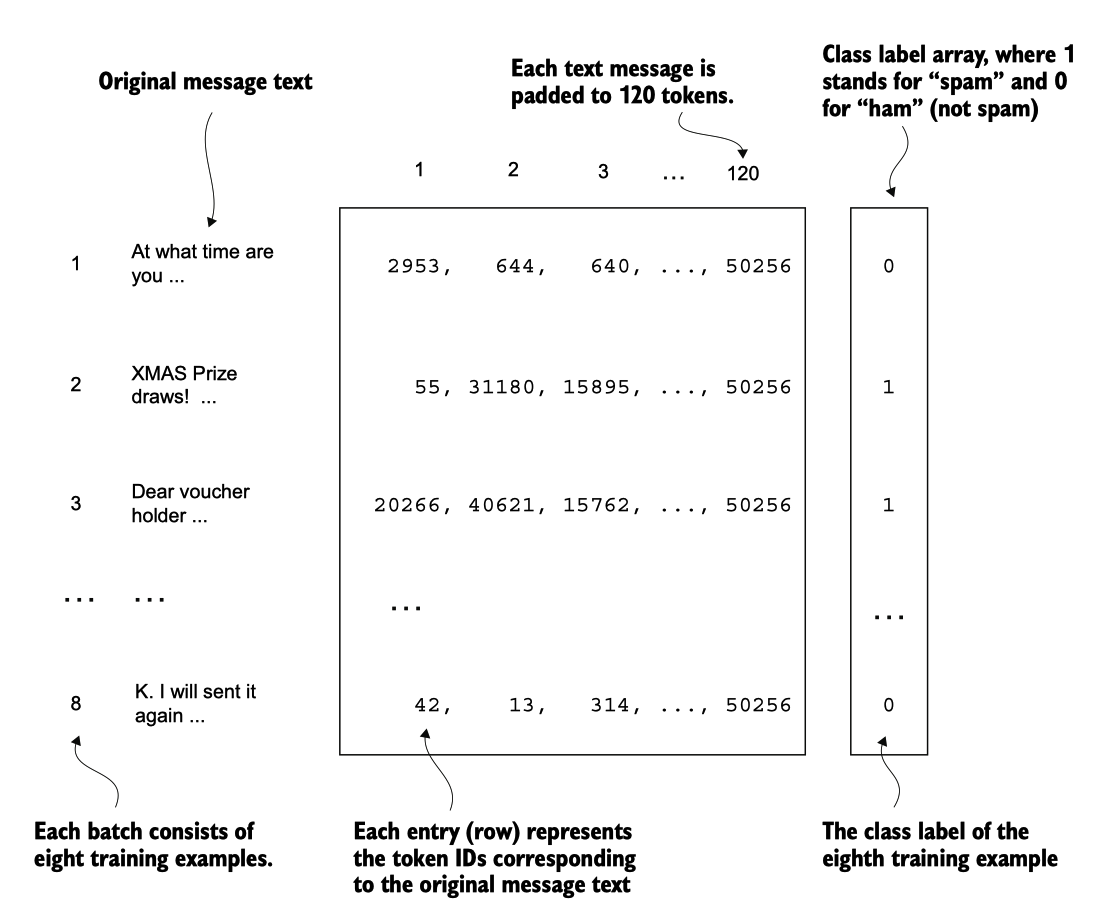
Figure 6.7 A single training batch consisting of eight text messages represented as token IDs. Each text message contains 120 token IDs. A class-label array stores the eight class labels corresponding to the text messages, which can be 0 (“not spam”) or 1 (“spam”).
The code in the following listing creates training, validation, and test data loaders that load text messages and labels with a batch size of 8.
To make sure the data loaders work correctly and actually return batches of the expected size, we iterate over the training loader and then print the tensor dimensions of the last batch:
As we can see, the input batch consists of eight training examples, each containing 120 tokens, as expected. The label tensor stores the class labels corresponding to these eight training examples.
Finally, to get a sense of the dataset size, let's print the total number of batches in each dataset: