Loading a pretrained LLM
We spent a lot of time preparing the dataset for instruction fine-tuning, which is a key part of the supervised fine-tuning process. Many other aspects are the same as in pretraining, allowing us to reuse a lot of code from earlier chapters.
Before we can start instruction fine-tuning, we first have to load a pretrained GPT model that we want to fine-tune (see Figure 7.15), a process we've gone through before.
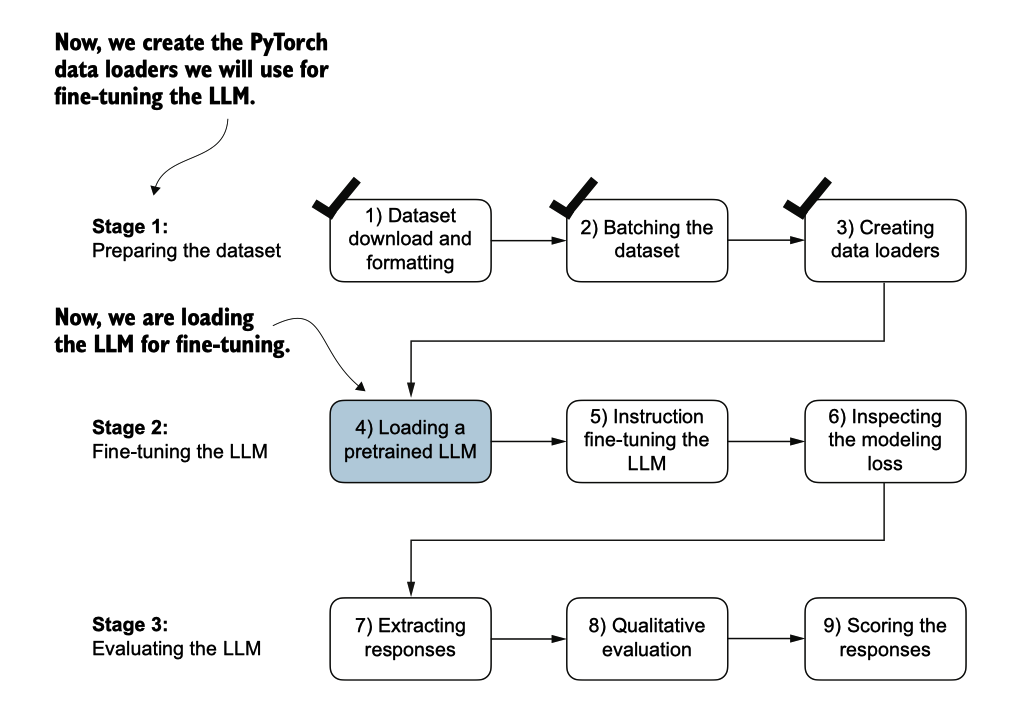
Figure 7.15 The three-stage instruction fine-tuning process for large language models (LLMs).
Loading our pretrained model requires the same code we used for pretraining and for fine-tuning for classification, except that we now specify "gpt2-medium (355M)" instead of "gpt2-small (124M)".
Now let's take a moment to evaluate how the pretrained LLM performs on one of the validation tasks by comparing its output with the expected response. This will give us a baseline for how well the model performs on instruction-following tasks without fine-tuning and will help us later when we evaluate the effect of fine-tuning. We'll use the first example from the validation set for this evaluation.
Next, we use the same generation function we used when pretraining the model to generate the model's response.
The generate function returns the combined input and output text. This behavior was convenient earlier because pretrained LLMs are primarily designed as text completion models, where input and output are concatenated to create coherent, readable text. However, when evaluating a model's performance on a specific task, we usually want to focus on the response the model generated.
To isolate the model's response text, we need to subtract the length of the input instruction from the beginning of the generated text.
This code removes the input text from the beginning of the generated text, leaving only the response generated by the model.
The output shows that the pretrained model is not yet able to follow the given instruction correctly. Although it does create a response section, it merely repeats the original input sentence and part of the instruction, failing to convert the active-voice sentence to passive voice as requested.
So let's now implement the fine-tuning process to improve the model's ability to understand and respond appropriately to such requests.
Fine-Tuning the LLM on Instruction Data
It's time to fine-tune the LLM to follow instructions (Figure 7.16).
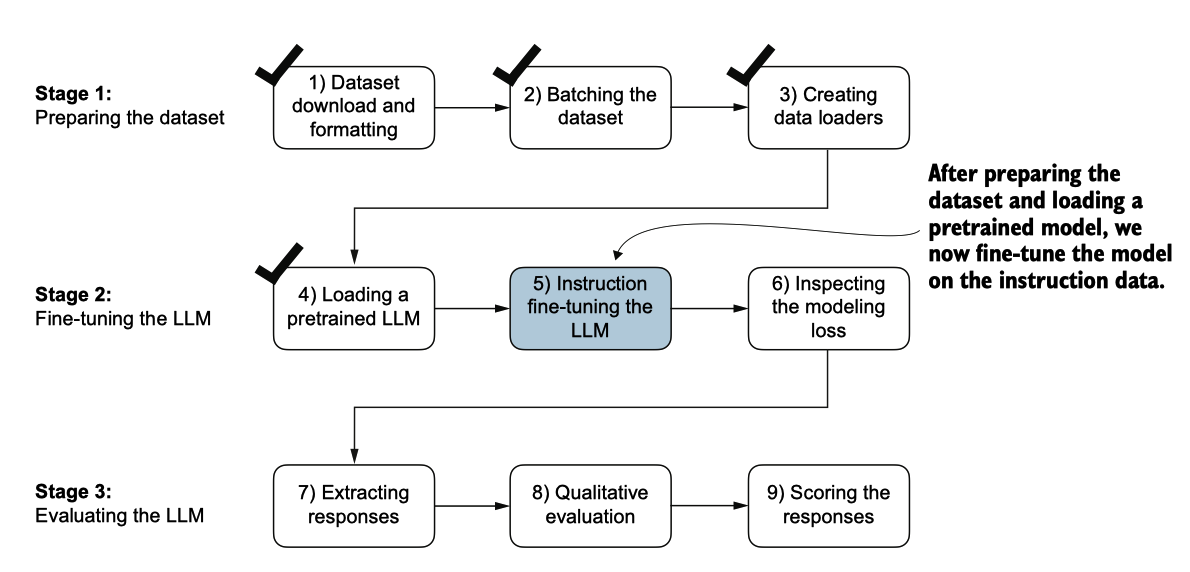
Figure 7.16 The three-stage process for instruction fine-tuning an LLM. In step 5, we train the previously loaded pretrained model on the instruction dataset we prepared earlier.
We'll take the pretrained model loaded above and train it further using the instruction dataset we prepared earlier in this chapter. All the heavy lifting was already done when we implemented instruction dataset processing at the beginning.
For the fine-tuning process itself, we can reuse the loss calculation and training functions we implemented earlier:
from previous_chapters import (
    calc_loss_loader,
    train_model_simple
)
Before we start training, let's calculate the initial loss for the training and validation sets.
With the model and data loaders ready, we can now start training the model. The code below sets up the training process, including initializing the optimizer, setting the number of epochs, and defining the evaluation frequency and the initial context for evaluating the generated LLM response, based on the first validation-set instruction we used earlier (val_data[0]).
The training output shows that the model is learning effectively, as indicated by the training and validation losses steadily decreasing over the two epochs. This result suggests that the model is gradually improving its ability to understand and follow the provided instructions. (Because the model showed effective learning during these two epochs, extending training to a third epoch or more is not necessary and may even be counterproductive, since it could increase overfitting.)
In addition, the response generated at the end of each epoch lets us check the model's progress in correctly performing the given task on a validation-set example. In this case, the model successfully converted the active sentence "The chef cooks the meal every day." into its passive-voice counterpart: "The meal is cooked every day by the chef."
We'll review and evaluate the quality of the model's responses in more detail later. For now, let's inspect the training and validation loss curves to gain a deeper understanding of the model's learning process. To do that, we use the same plot_losses function as during pretraining:
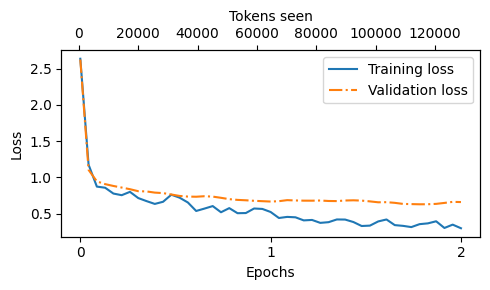
Figure 7.17 Trends in training and validation loss over two epochs. The solid line represents training loss, which shows a sharp decline before leveling off, while the dashed line represents validation loss, which follows a similar pattern.
From the loss plot shown in Figure 7.17, we can see that the model's performance on both the training and validation sets improves significantly as training progresses. The rapid drop in loss during the initial phase shows that the model quickly learns meaningful patterns and representations from the data. Then, as training enters the second epoch, the loss continues to decrease, but more slowly.
Although the loss plot in Figure 7.17 indicates that the model is training effectively, the most important aspect is its performance in terms of response quality and accuracy. So next we'll extract the responses and store them in a format that lets us evaluate and quantify response quality.
Extracting and Saving Responses
Now that we've fine-tuned the LLM on the instruction dataset during the training portion, we're ready to evaluate its performance on the held-out test set. First, we extract the model response generated for each input in the test dataset and collect them for manual analysis; then we evaluate the LLM to quantify response quality, as shown in Figure 7.18.
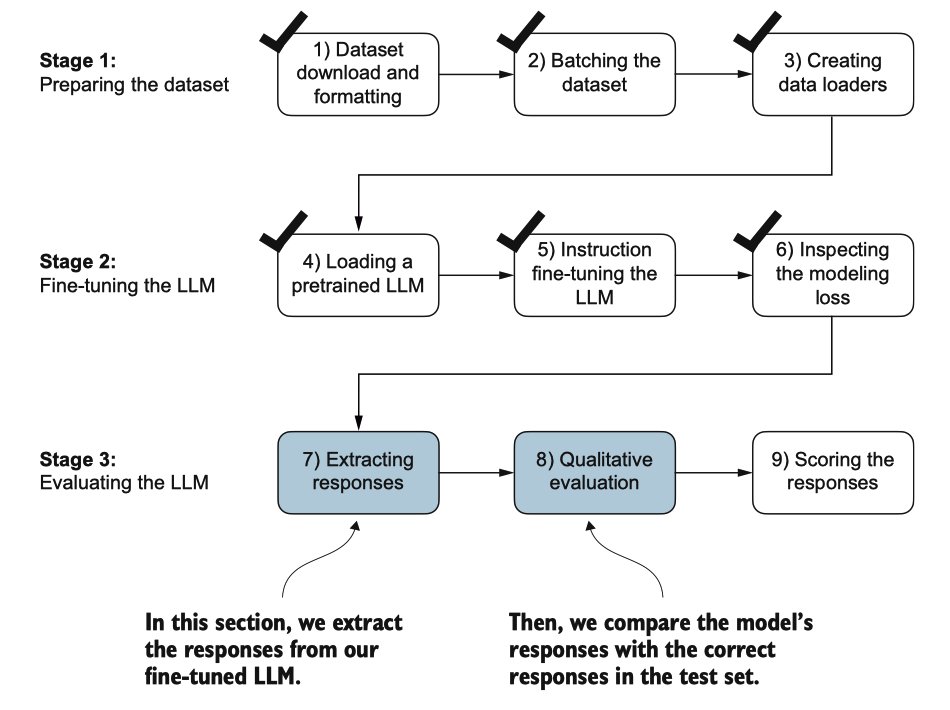
Figure 7.18 The three-stage process for instruction fine-tuning an LLM. In the first two steps of the third stage, we extract and collect model responses on the held-out test dataset for further analysis, then evaluate the model to quantify the performance of the instruction-fine-tuned LLM.
To complete the response-generation step, we use the generate function. Then we print the model response along with the expected answer for the first three test-set entries, showing them side by side for comparison:
Based on the test-set instructions, the given answers, and the model's answers, we can see that the model performs relatively well. The answers to the first and last instructions are clearly correct, while the second answer is close but not entirely accurate.
Most importantly, model evaluation is not as simple as it was after fine-tuning for classification, where we just calculated the percentage of correct spam/non-spam class labels to get classification accuracy. In practice, instruction-fine-tuned large language models (LLMs) such as chatbots are evaluated using several methods:
- Short-answer and multiple-choice benchmarks, such as Measuring Massive Multitask Language Understanding (MMLU; https://arxiv.org/abs/2009.03300), used to test the model's general knowledge.
- Human preference comparisons with other large language models (LLMs), such as the LMSYS Chatbot Arena (https://arena.lmsys.org).
- Automated conversation benchmarks in which other large language models such as GPT-4 evaluate responses, for example AlpacaEval (https://tatsu-lab.github.io/alpaca_eval/).
In practice, it's useful to consider all three evaluation approaches: multiple-choice answering, human evaluation, and automated metrics that measure conversational performance. However, since we're mainly interested in evaluating conversational performance, not just the ability to answer multiple-choice questions, human evaluation and automated metrics may be more relevant.
[!NOTE] Conversational performance
LLM conversational performance refers to their ability to communicate with humans in a human-like way by understanding context, nuance, and intent. It includes skills such as providing relevant and coherent responses, maintaining consistency, and adapting to different topics and interaction styles.
Although human evaluation provides valuable insights, it can be relatively tedious and time-consuming when dealing with a large number of responses. For example, reading and rating all 1,100 responses would require considerable effort.
Therefore, given the scale of the task at hand, we'll implement an approach similar to automated conversation benchmarks, which involves using another LLM to evaluate responses automatically. This approach will let us efficiently assess the quality of the generated responses without a large amount of human involvement, saving time and resources while still producing meaningful performance metrics.
Let's adopt an approach inspired by AlpacaEval, using another LLM to evaluate our fine-tuned model's responses. However, instead of relying on a publicly available benchmark dataset, we'll use our own custom test set. This customization lets us evaluate the model's performance more specifically and relevantly in the context of the intended use cases reflected in our instruction dataset.
To prepare responses for this evaluation process, we'll append the generated model responses to the test_set dictionary and save the updated data to a file named "instruction-data-with-response.json" for record-keeping. In addition, saving this file makes it easy to load and analyze the responses in later Python sessions if needed.
The following code listing uses the generate method in the same way as before; however, we now iterate over the entire testset. Also, instead of printing the model response, we add it to the testset dictionary.
Let's verify that the responses were added correctly by inspecting one entry in the test_set dictionary.
Finally, we save the model as a file named gpt2-medium355M-sft.pth so it can be reused in future projects.