Evaluating the fine-tuned LLM
Previously, we evaluated the performance of the instruction-fine-tuned model by looking at its responses to three examples from the test set. Although this gave us a rough sense of how the model was doing, the approach isn't efficient when dealing with a larger number of responses. So we implemented a method that uses another, larger LLM to automate evaluation of the fine-tuned LLM's responses, as shown in Figure 7.19.
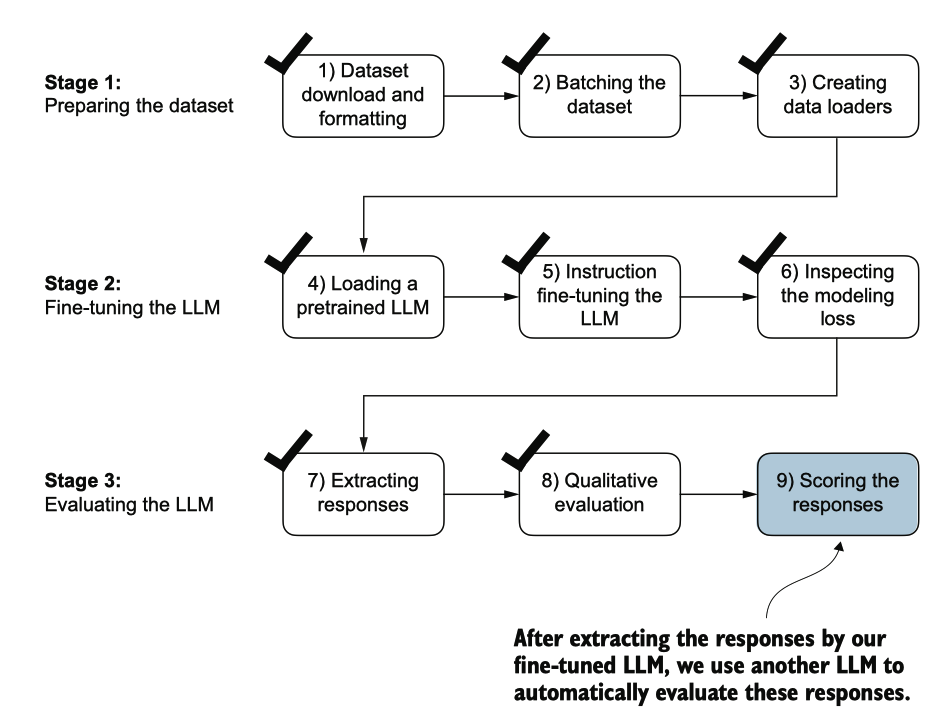
Figure 7.19 The three-stage process of LLM instruction fine-tuning. In the final step of the instruction fine-tuning pipeline, we implemented a method to quantify the fine-tuned model's performance by scoring the responses it generated for the test set.
To evaluate the test set responses automatically, we used the existing 8-billion-parameter Llama 3 model, developed by Meta AI and already instruction-tuned. You can run this model locally through the open-source Ollama application (https://ollama.co m).
An alternative to interacting with the model via the ollama run command is to use Python through its REST API. The query_model function in the following code demonstrates how to use that API.
import urllib.request

def query_model(
    prompt,
    model="llama3",
    url="http://localhost:11434/api/chat"
):
    # Create the data payload as a dictionary
    data = {
        "model": model,
        "messages": [
            {"role": "user", "content": prompt}
        ],
        "options": {     # Settings below are required for deterministic responses
            "seed": 123,
            "temperature": 0,
            "num_ctx": 2048
        }
    }

    # Convert the dictionary to a JSON formatted string and encode it to bytes
    payload = json.dumps(data).encode("utf-8")

    # Create a request object, setting the method to POST and adding necessary headers
    request = urllib.request.Request(
        url,
        data=payload,
        method="POST"
    )
    request.add_header("Content-Type", "application/json")

    # Send the request and capture the response
    response_data = ""
    with urllib.request.urlopen(request) as response:
        # Read and decode the response
        while True:
            line = response.readline().decode("utf-8")
            if not line:
                break
            response_json = json.loads(line)
            response_data += response_json["message"]["content"]

    return response_data

model = "llama3"
result = query_model("What do Llamas eat?", model)
print(result)

## python
Llamas are herbivores, which means they primarily feed on plant-based foods. Their diet typically consists of:

1. Grasses: Llamas love to graze on various types of grasses, including tall grasses, short grasses, and even weeds.
2. Hay: High-quality hay, such as alfalfa or timothy hay, is a staple in a llama's diet. They enjoy the sweet taste and texture of fresh hay.
3. Grains: Llamas may receive grains like oats, barley, or corn as part of their daily ration. However, it's essential to provide these grains in moderation, as they can be high in calories.
4. Fruits and vegetables: Llamas enjoy a variety of fruits and veggies, such as apples, carrots, sweet potatoes, and leafy greens like kale or spinach.
5. Minerals: Llamas require access to mineral supplements, which help maintain their overall health and well-being.
Using the previously defined query_model function, we can evaluate the responses generated by our fine-tuned model. The function prompts the Llama 3 model to score our fine-tuned model's response on a scale from 0 to 100, using the given test-set response as a reference.
First, we applied this method to the first three examples in the test set that we had examined earlier. The code prints output similar to the following (as of this writing, Ollama is not fully deterministic, so the generated text may vary):
for entry in test_data[:3]:
    prompt = (
        f"Given the input `{format_input(entry)}` "
        f"and correct output `{entry['output']}`, "
        f"score the model response `{entry['model_response']}`"
        f" on a scale from 0 to 100, where 100 is the best score. "
    )
    print("\nDataset response:")
    print(">>", entry['output'])
    print("\nModel response:")
    print(">>", entry["model_response"])
    print("\nScore:")
    print(">>", query_model(prompt))
    print("\n-------------------------")
The generated responses show that the Llama 3 model provides reasonable evaluations and can assign partial credit when the model's answer isn't entirely correct.
The earlier prompt returned detailed evaluation information along with a score. We can modify the prompt to generate only an integer score from 0 to 100, with 100 representing the best score. This change lets us calculate the model's average score, giving us a more concise and quantitative assessment of its performance. The generatemodelscores function shown in the following code listing uses the modified prompt, instructing the model to "Respond with the integer number only."
def generate_model_scores(json_data, json_key, model="llama3"):
    scores = []
    for entry in tqdm(json_data, desc="Scoring entries"):
        prompt = (
            f"Given the input `{format_input(entry)}` "
            f"and correct output `{entry['output']}`, "
            f"score the model response `{entry[json_key]}`"
            f" on a scale from 0 to 100, where 100 is the best score. "
            f"Respond with the integer number only."
        )
        score = query_model(prompt, model)
        try:
            scores.append(int(score))
        except ValueError:
            print(f"Could not convert score: {score}")
            continue

    return scores

scores = generate_model_scores(test_data, "model_response")
print(f"Number of scores: {len(scores)} of {len(test_data)}")
print(f"Average score: {sum(scores)/len(scores):.2f}\n")

## output
Number of scores: 110 of 110
Average score: 50.32
Note that at the time of this writing, Ollama's behavior is not fully deterministic across operating systems, meaning the scores you get may differ slightly from the previous ones. For more robust results, you can repeat the evaluation several times and average the resulting scores.
To further improve our model's performance, we can explore various strategies, such as:
- Tuning hyperparameters during fine-tuning, such as the learning rate, batch size, or number of training epochs
- Increasing the size of the training dataset or diversifying the examples to cover a broader range of topics and styles
- Trying different prompt or instruction formats to guide the model's responses more effectively
- Using a larger pretrained model, which may be more effective
Summary
This chapter marks the end of our journey through the LLM development cycle. We've covered all the necessary steps, including implementing the LLM architecture, pretraining the LLM, and fine-tuning it for specific tasks, as summarized in Figure 7.21. Let's discuss some ideas to explore next.
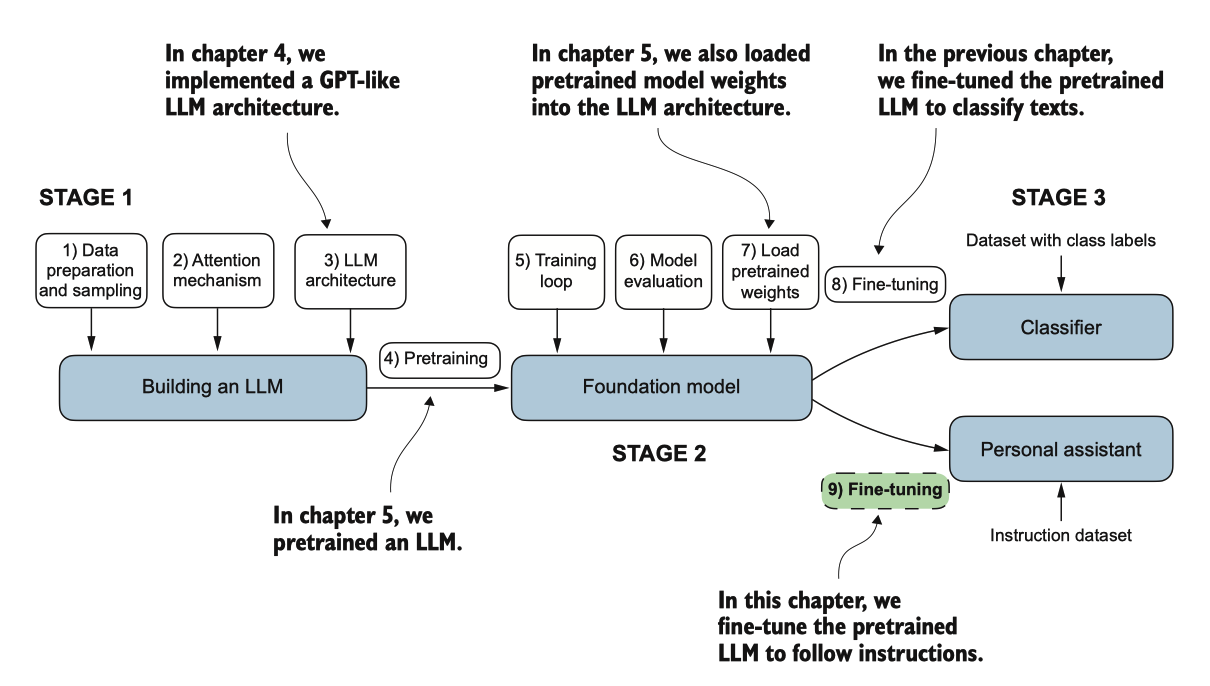
Figure 7.21 The three main stages of coding an LLM.
- The instruction fine-tuning process adapts a pretrained large language model (LLM) to follow human instructions and generate the desired responses.
- Preparing the dataset involves downloading an instruction-response dataset, formatting the entries, and splitting them into training, validation, and test sets.
- Training batches are constructed using a custom collate function that pads sequences, creates target token IDs, and masks padding tokens.
- We load a pretrained GPT-2 medium model with 355 million parameters as the starting point for instruction fine-tuning.
- We fine-tune the pretrained model on the instruction dataset using a training loop similar to the one used for pretraining.
- The evaluation process involves extracting the model's responses on the test set and scoring them (for example, with another LLM).
- The Ollama application using the 8-billion-parameter Llama model can automatically score the fine-tuned model's responses on the test set, providing an average score to quantify performance.