The Model Context Protocol (MCP) is built on a flexible, extensible architecture that enables seamless communication between LLM applications and integrations. This document covers the core architectural components and concepts.
Core Architecture
MCP follows a client-server architecture
Client 1: 1 Server Connect
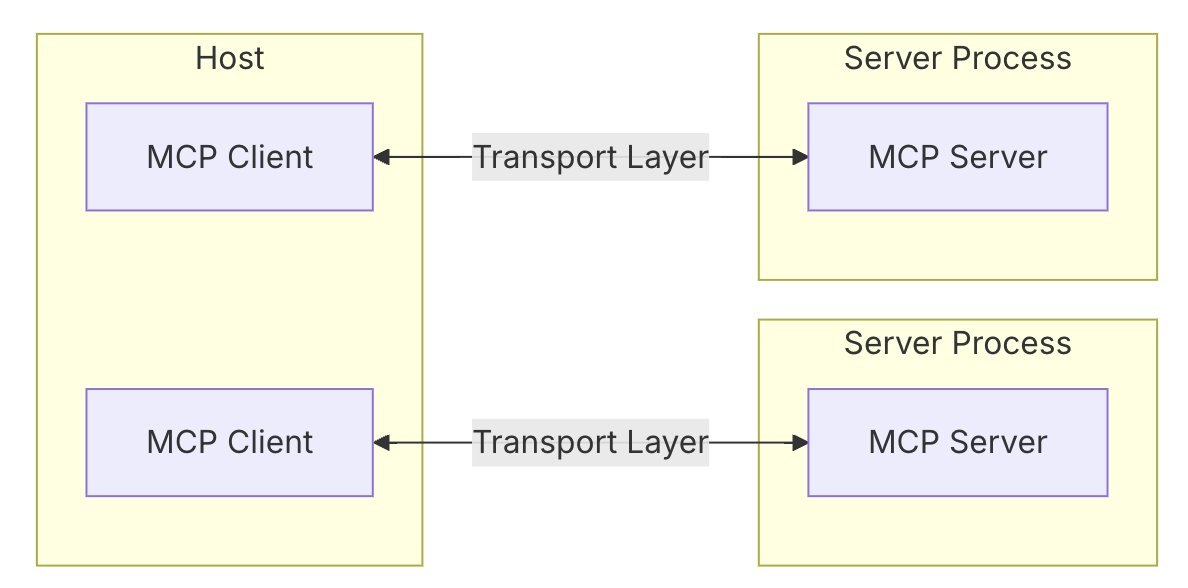
CleanShot 2025-03-06 at 10.02.18@2x.png
Core Components
Protocol Layer
Transport layer
The transport layer handles the actual communication between clients and servers. MCP supports several transport mechanisms:
- Stdio transport Standard I/O transport
- Communicates over standard input/output
- Well suited for local processes
- HTTP with SSE transport
- Uses server-sent events for server-to-client messages
- HTTP POST for client-to-server messages
All transports use JSON-RPC 2.0 for message exchange. See the specification for details on the Model Context Protocol message format.
Message types
- Requests
- Response
- Errors
- Notifications — one-way messages that don't expect a response
Connection Lifecycle
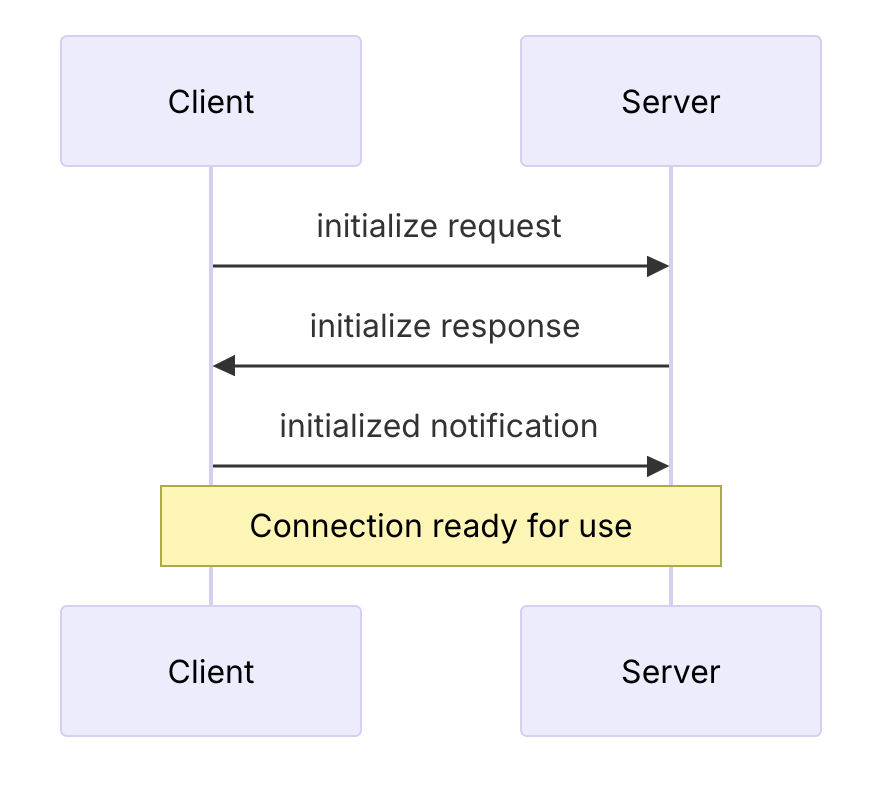
Initialization
CleanShot 2025-03-06 at 10.09.25@2x.png
- The client sends an
initializerequest with its protocol version and capabilities. - The server responds with its protocol version and capabilities.
- The client sends an
initializednotification as confirmation. - Normal message exchange begins.
Message exchange
After initialization, the following patterns are supported:
- Request-Response: The client or server sends a request, and the other side responds.
- Notifications: Either side sends a one-way message.
Termination
Either side can terminate the connection:
- By calling
close() - Transport disconnect
- Error conditions
Error Handling
SDKs and applications can define their own error codes with values greater than -32000.
Errors propagate in the following ways:
- Error responses to requests
- Error events on the transport
- Protocol-level error handlers
Example
Resources
Resources are a core primitive in the Model Context Protocol (MCP), allowing servers to expose data and content that clients can read and use as context for LLM interactions.
Resources represent any type of data an MCP server wants to provide to clients. This can include:
- File contents
- Database records
- API responses
- Live system data
- Screenshots and images
- Log files
- And more
Resource URIs
[protocol]://[host]/[path]
For example:
file:///home/user/documents/report.pdfpostgres://database/customers/schemascreen://localhost/display1
Client resource discovery
Direct resources
Resource templates
Reading Resources
Response
When reading a resource, the client initiates a resources/read request using the resource URI.
The server responds with a list of resource contents:
Resource updates
- List changes
The server can notify the client of changes to its list of available resources via thenotifications/resources/list_changednotification. - Content changes
Clients can subscribe to updates for a specific resource:- The client sends
resources/subscribewith the resource URI. - The server sends
notifications/resources/updatedwhen the resource changes. - The client can use
resources/readto fetch the latest content. - The client can use
resources/unsubscribeto unsubscribe.
- The client sends
Example
Prompts
Prompts let servers define reusable prompt templates and workflows that clients can easily present to users and LLMs. They provide a powerful way to standardize and share common LLM interactions.
Prompts in MCP are predefined templates that can:
- Accept dynamic arguments
- Include context from resources
- Chain multiple interactions
- Guide specific workflows
- Surface as UI elements (such as slash commands)
Structure
Example
Tools
Tools are a powerful primitive in the Model Context Protocol (MCP) that lets servers expose executable functionality to clients. Through tools, LLMs can interact with external systems, perform computations, and take actions in the real world.
Tools in MCP allow servers to expose executable functions that clients can invoke and LLMs can use to perform actions. Key aspects of tools include:
- Discovery: Clients can list available tools through the
tools/listendpoint. - Invocation: Tools are invoked through the
tools/callendpoint; the server performs the requested operation and returns the result. - Flexibility: Tools can range from simple calculations to complex API interactions.
Structure
Example
Roots
Roots are an MCP concept that defines the scope in which a server can operate. They provide a way for clients to tell servers about relevant resources and their locations.
A root is a URI that a client suggests the server should focus on. When a client connects to a server, it declares which roots the server should work with. Although primarily used for filesystem paths, roots can be any valid URI, including HTTP URLs.
file:///home/user/projects/myapp
https://api.example.com/v1
Roots serve several important functions:
- Guidance: They inform the server about relevant resources and locations.
- Clarity: Roots clarify which resources belong to your workspace.
- Organization: Multiple roots let you work with different resources at the same time.