MCP is an open protocol that standardizes how applications provide context to LLMs. Think of MCP as the USB-C port for AI applications. Just as USB-C provides a standardized way to connect your devices to various peripherals and accessories, MCP provides a standardized way to connect AI models to different data sources and tools.
Why MCP?
MCP helps you build agents and complex workflows on top of LLMs. LLMs often need to integrate with data and tools, and MCP provides:
- A growing list of pre-built integrations that your LLM can plug into directly
- The flexibility to switch between LLM providers and vendors
- Best practices for securing your data within your infrastructure
Architecture
At its core, MCP follows a client-server architecture where a host application can connect to multiple servers:
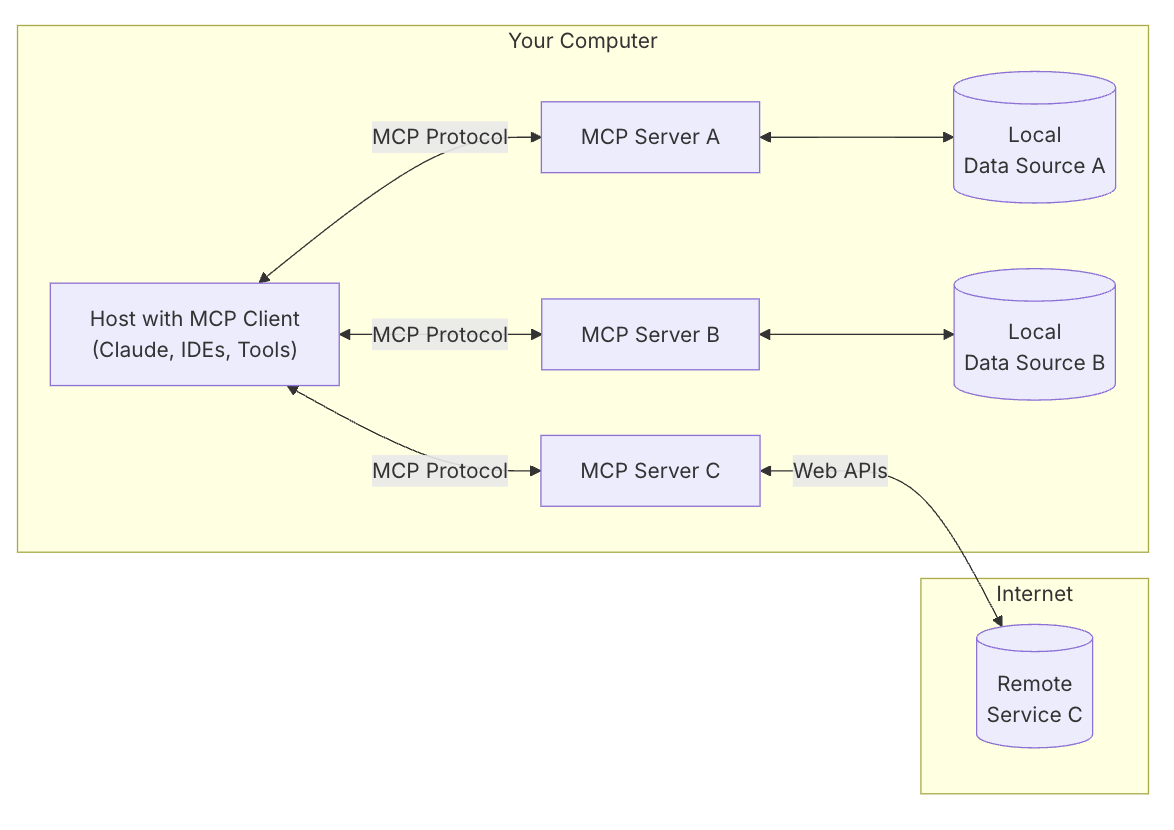
CleanShot 2025-03-06 at 09.45.44@2x.png
- MCP Hosts: Programs like Claude Desktop, IDEs, or AI tools that want to access data through MCP
- MCP Clients: Protocol clients that maintain a 1:1 connection with servers
- MCP Servers: Lightweight programs that each expose specific capabilities through the standardized Model Context Protocol
- Local Data Sources: Your computer's files, databases, and services that MCP servers can securely access
- Remote Services: External systems accessible over the internet (for example, via APIs) that MCP servers can connect to
Build an MCP Server
We'll build a server that exposes two tools: get-alerts and get-forecast. Then we'll connect the server to an MCP host.
Core MCP Concepts
MCP servers can provide three main types of capabilities:
- Resources: Data that clients can read (such as API responses or file contents)
- Tools: Functions that can be called by the LLM (with user consent)
- Prompts: Pre-written templates that help users accomplish specific tasks
Java Example
System Requirements
- Java 17 or later
- Spring Boot 3.3.x or later
Dependencies
<dependencies>
      <dependency>
          <groupId>org.springframework.ai</groupId>
          <artifactId>spring-ai-mcp-server-spring-boot-starter</artifactId>
      </dependency>

      <dependency>
          <groupId>org.springframework</groupId>
          <artifactId>spring-web</artifactId>
      </dependency>
</dependencies>
Application Properties
logging:
  pattern:
    console:
spring:
  main:
    banner-mode: off
Code
@Service
public class WeatherService {

    private final RestClient restClient;

    public WeatherService() {
        this.restClient = RestClient.builder()
            .baseUrl("https://api.weather.gov")
            .defaultHeader("Accept", "application/geo+json")
            .defaultHeader("User-Agent", "WeatherApiClient/1.0 (your@email.com)")
            .build();
    }

  @Tool(description = "Get weather forecast for a specific latitude/longitude")
  public String getWeatherForecastByLocation(
      double latitude,   // Latitude coordinate
      double longitude   // Longitude coordinate
  ) {
      // Returns detailed forecast including:
      // - Temperature and unit
      // - Wind speed and direction
      // - Detailed forecast description
  }

  @Tool(description = "Get weather alerts for a US state")
  public String getAlerts(
      @ToolParam(description = "Two-letter US state code (e.g. CA, NY") String state)
  ) {
      // Returns active alerts including:
      // - Event type
      // - Affected area
      // - Severity
      // - Description
      // - Safety instructions
  }

  // ......
}
@SpringBootApplication
public class McpServerApplication {

    public static void main(String[] args) {
        SpringApplication.run(McpServerApplication.class, args);
    }

    @Bean
    public ToolCallbackProvider weatherTools(WeatherService weatherService) {
        return  MethodToolCallbackProvider.builder().toolObjects(weatherService).build();
    }
}
Test With Java Client
- Manually
var stdioParams = ServerParameters.builder("java")
  .args("-jar", "/ABSOLUTE/PATH/TO/PARENT/FOLDER/mcp-weather-stdio-server-0.0.1-SNAPSHOT.jar")
  .build();

var stdioTransport = new StdioClientTransport(stdioParams);

var mcpClient = McpClient.sync(stdioTransport).build();

mcpClient.initialize();

ListToolsResult toolsList = mcpClient.listTools();

CallToolResult weather = mcpClient.callTool(
  new CallToolRequest("getWeatherForecastByLocation",
      Map.of("latitude", "47.6062", "longitude", "-122.3321")));

CallToolResult alert = mcpClient.callTool(
  new CallToolRequest("getAlerts", Map.of("state", "NY")));

mcpClient.closeGracefully();
- Auto
<dependency>
    <groupId>org.springframework.ai</groupId>
    <artifactId>spring-ai-mcp-client-spring-boot-starter</artifactId>
</dependency>
spring.ai.mcp.client.stdio.servers-configuration=file:PATH/TO/claude_desktop_config.json