Loading and Saving Model Weights in PyTorch
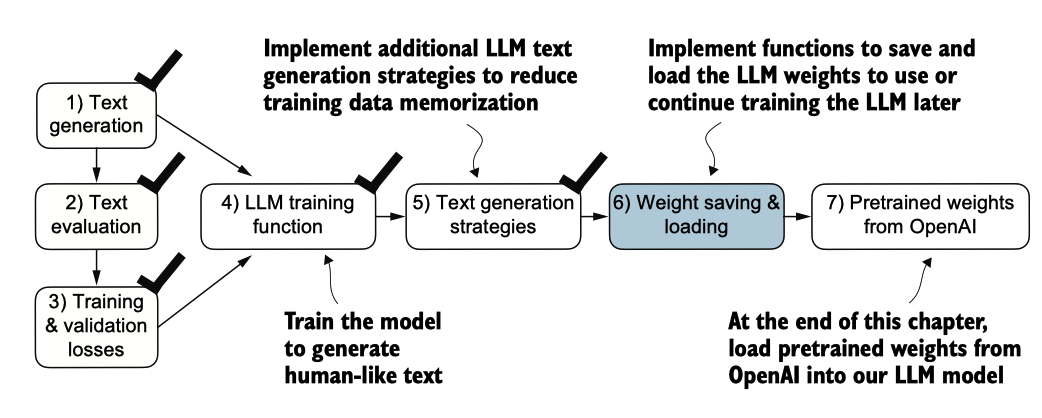
Figure 5.16 Saving the model after training and checking it is often helpful so that we can use it later or continue training it (Step 6).
Up to this point, we've discussed how to numerically evaluate training progress and how to pretrain an LLM from scratch. Although both the LLM and the dataset are relatively small, this exercise shows that pretraining an LLM is computationally expensive. So being able to save the LLM matters: when we want to use it in a new session, we don't have to rerun training from scratch each time.
All right, let's discuss how to save and load a pretrained model, as shown in Figure 5.16. Later, we'll load a more powerful pretrained GPT model from OpenAI into our GPTModel instance.
Fortunately, saving a PyTorch model is relatively straightforward. The recommended approach is to use the torch.save function to save the model's state_dict, which is a dictionary that maps each layer to its parameters:
torch.save(model.state_dict(), "model.pth")
"model.pth" is the filename for the saved state_dict. The .pth extension is conventional for PyTorch files, although technically we can use any file extension.
Then, after saving the model weights via state_dict, we can load them into a new GPTModel instance:
As discussed earlier, dropout helps prevent the model from overfitting the training data by randomly “dropping” neurons in a layer during training. During inference, however, we don't want to randomly lose any of the information the network has learned. Using model.eval() switches the model to evaluation mode for inference, disabling the model's dropout layers. If we plan to continue pretraining the model later—for example, using the trainmodelsimple function we defined earlier in this chapter—saving the optimizer state is also recommended.
Adaptive optimizers such as AdamW store additional parameters for each model weight. AdamW uses historical data to dynamically adjust the learning rate for each model parameter. Without it, the optimizer resets, and the model may learn poorly or even fail to converge properly, meaning it can lose the ability to generate coherent text. Using torch.save, we can save the state_dict contents of both the model and the optimizer:
We can then restore the model and optimizer states by first loading the saved data with torch.load and then using the loadstatedict method:
Loading Pretrained Weights from OpenAI
Previously, we trained a small GPT-2 model on a limited dataset of short-story books. This approach let us focus on the fundamentals without requiring a huge amount of time and compute.
Fortunately, OpenAI publicly shared the weights of its GPT-2 models, eliminating the need to spend tens or hundreds of thousands of dollars retraining a model on a large corpus yourself. So let's load these weights into our GPTModel class and use the model for text generation. Here, weights refers to the weight parameters stored in the .weight attributes of PyTorch linear and embedding layers.
For example, we access them through model.parameters() when training the model. In Chapter 6, we'll reuse these pretrained weights to fine-tune the model for a text classification task and for following instructions similar to ChatGPT.
Download the gpt_download.py Python module directly from this chapter's online repository:
# Relative import from the gpt_download.py contained in this folder
from gpt_download import download_and_load_gpt2
Running this code downloads the following seven files associated with the 124M-parameter GPT-2 model:
Assuming the previous code has finished running, let's inspect the contents of settings and params:
Both settings and params are Python dictionaries. The settings dictionary stores the LLM architecture settings, similar to the GPTCONFIG124M settings we defined manually.
The params dictionary contains the actual weight tensors. Note that we printed only the dictionary keys because printing the weight contents would take up too much screen space. However, we can inspect these weight tensors by printing the entire dictionary (using print(params)) or by selecting individual tensors via their dictionary keys—for example, the embedding-layer weights:
We downloaded and loaded the weights of the smallest GPT-2 model using downloadandloadgpt2(modelsize="124M", ...). OpenAI also shared the weights of larger models: 355M, 774M, and 1558M. The overall architecture of these different-sized GPT models is the same.
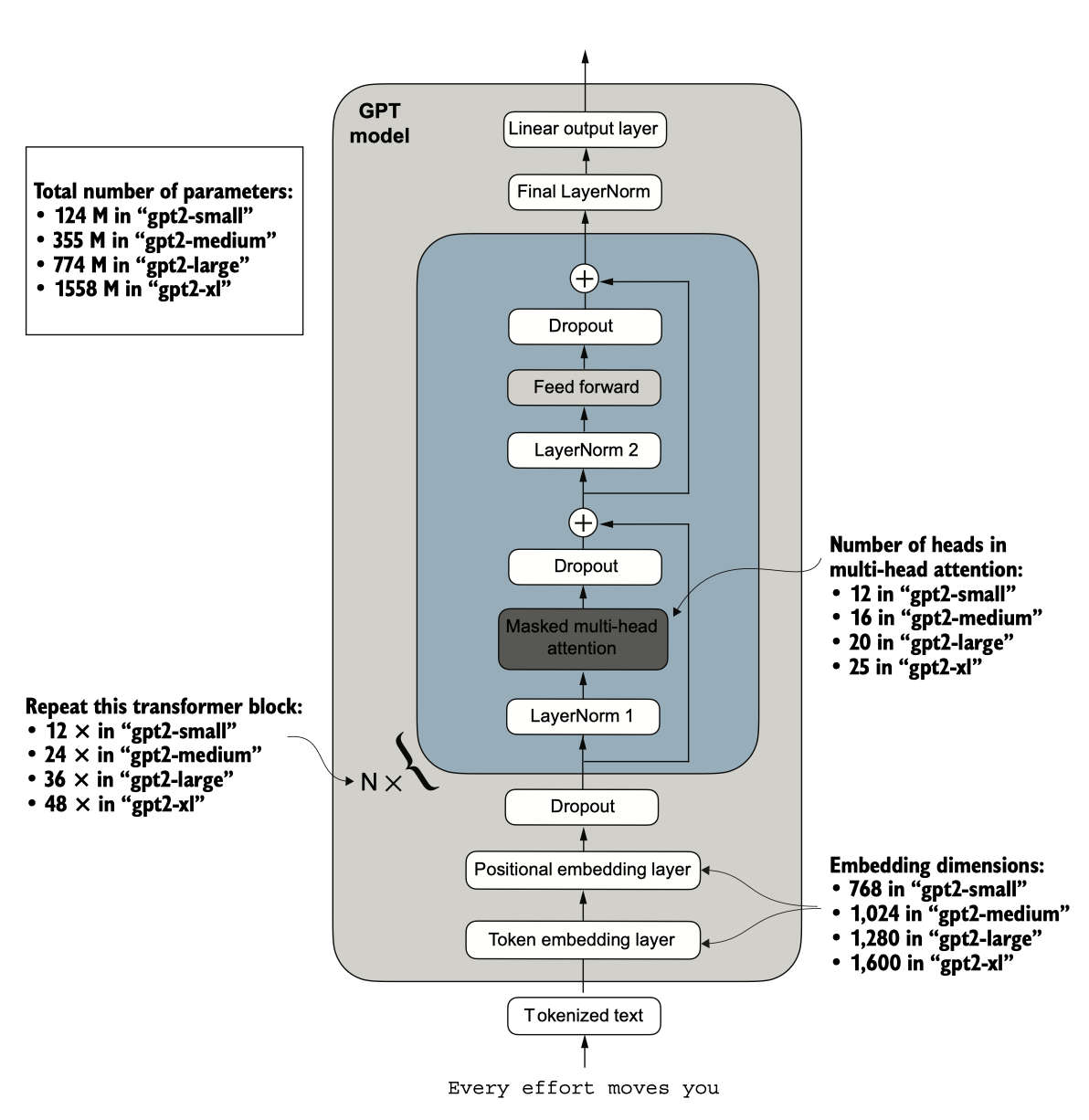
Figure 5.17 GPT-2 LLMs come in several model sizes, ranging from 124 million to 1.558 billion parameters. The core architecture is the same; the only differences are the embedding size and how many times individual components such as attention heads and transformer blocks are repeated.
After loading the GPT-2 model weights into Python, we still need to transfer them from the settings and params dictionaries into our GPTModel instance. First, we create a dictionary listing the differences among the GPT model sizes shown in Figure 5.17.
Suppose we're interested in loading the smallest model, "gpt2-small (124M)." We can update the full-length GPTCONFIG124M we defined and used earlier with the corresponding settings from the model configuration table:
Careful readers may remember that we previously used a length of 256 tokens, but OpenAI's original GPT-2 model was trained with a length of 1,024 tokens, so we must update NEW_CONFIG accordingly.
In addition, OpenAI used bias vectors in the linear layers of the multi-head attention module for computing the query, key, and value matrices. In large language models (LLMs), bias vectors are no longer commonly used because they don't improve modeling performance and are therefore unnecessary. However, since we're using pretrained weights, we need to match the settings for consistency and enable these bias vectors.
Load Config
We can now initialize a new GPTModel instance using the updated NEW_CONFIG dictionary:
Compare Shapes
By default, a GPTModel instance is initialized with random weights. The final step in using OpenAI's model weights is to overwrite these random weights with the weights we loaded into the params dictionary. To do this, we'll first define a small assignment utility function that checks whether two tensors or arrays (left and right) have the same dimensions or shape and returns the right tensor as a trainable PyTorch parameter:
Load Weights
Next, we define a loadweightsinto_gpt function that loads the weights from the params dictionary into the GPTModel instance gpt.
In the loadweightsintogpt function, we carefully matched the weights from OpenAI's implementation to our GPTModel implementation. As a concrete example, OpenAI stores the weight tensor for the output projection layer of the first transformer block as params["blocks"][0]["attn"]["cproj"]["w"]. In our implementation, this weight tensor corresponds to gpt.trfblocks[b].att.outproj.weight, where gpt is a GPTModel instance.
Developing the loadweightsinto_gpt function took a lot of guesswork because OpenAI used a slightly different naming convention from ours. However, if we try to match two tensors with different dimensions, the assign function will alert us. Moreover, if we make a mistake in this function, we'll notice because the resulting GPT model won't be able to produce coherent text.
Now let's put loadweightsinto_gpt into practice and load the OpenAI model weights into our GPTModel instance gpt:
load_weights_into_gpt(gpt, params)
gpt.to(device);
Test Generate Text
If the model loaded correctly, we can now use our previous generation function to generate new text.
We can be confident that we loaded the model weights correctly because the model can generate coherent text. A tiny mistake in this process would cause the model to fail. In the following chapters, we'll put this pretrained model to further use and fine-tune it for text classification and instruction following.
Summary
- When a large language model (LLM) generates text, it outputs one token at a time.
- By default, the next token is chosen by converting the model output into probability scores and selecting the token from the vocabulary with the highest probability score—a method called “greedy decoding.”
- Through probabilistic sampling and temperature scaling, we can influence the diversity and consistency of the generated text.
- During training, we can use training and validation losses to evaluate the quality of the text an LLM generates.
- Pretraining an LLM means adjusting its weights to minimize the training loss.
- The LLM training loop itself is a standard deep learning procedure, using the usual cross-entropy loss and the AdamW optimizer.
- Pretraining an LLM on a large text corpus is time-consuming and resource-intensive, so we can load publicly available weights as an alternative to pretraining a model ourselves on a large dataset.